
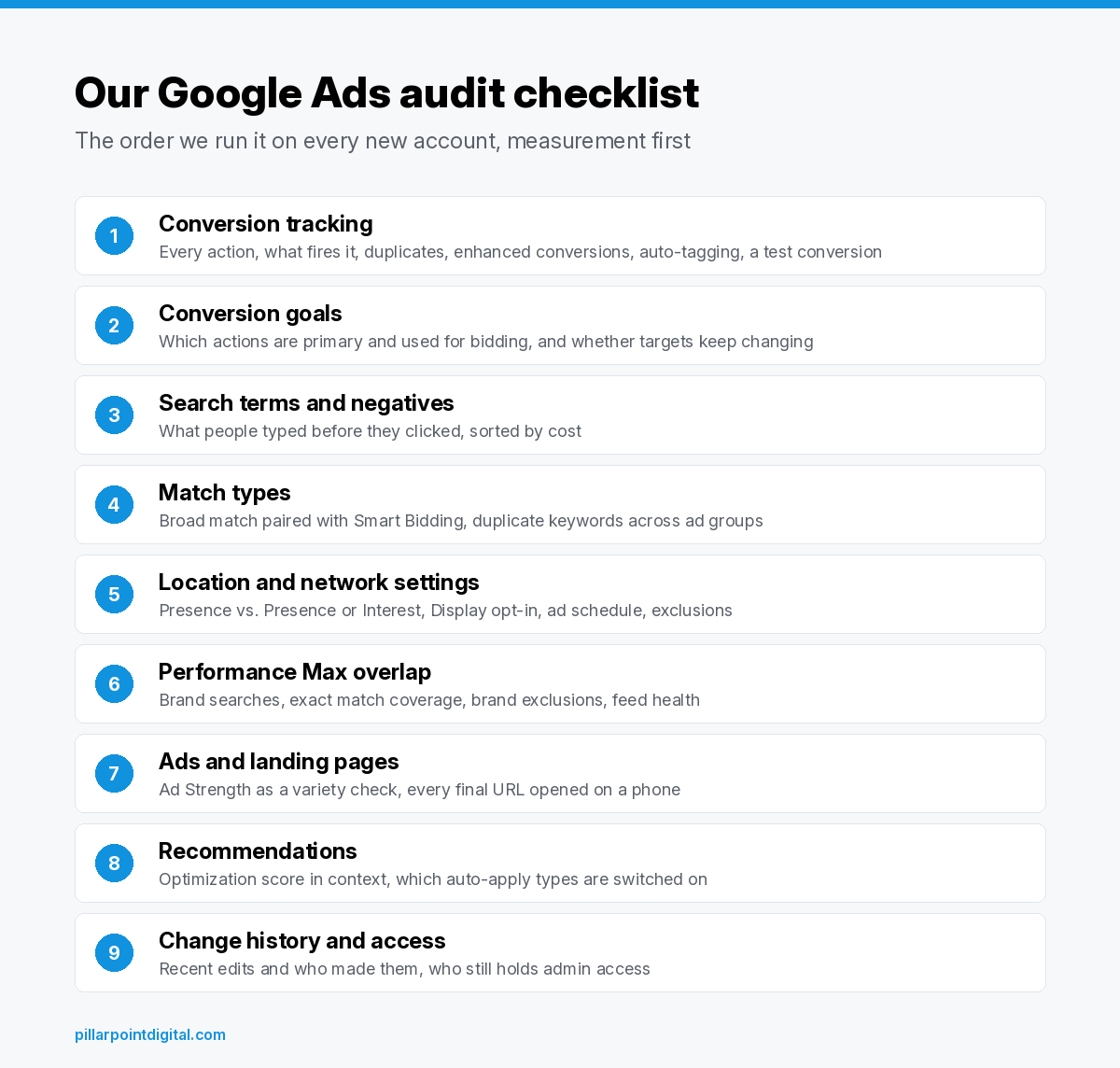
A Google Ads audit checklist works best when it follows the money. We check conversion tracking first, then what bidding is told to optimize for, then search terms, match types, location and network settings, Performance Max overlap, ads and landing pages, and finally recommendations and change history. If the tracking is wrong, every other finding is a guess.
We’re a small agency in Fort Wayne, and the two founders who own the company are the same two people who open every new account. This is the list we work through when someone grants us read-only access, in the order we work it. It’s a method, not a pitch, so you can run most of it yourself if you have a quiet afternoon and some patience with the Google Ads interface.
Why does the order of a Google Ads audit matter?
Most audits we’ve seen from other shops are a long list of findings with no ranking, every item flagged in the same shade of red. That’s hard to act on, and it hides the one or two problems that are quietly skewing everything else.
The trouble is that Google Ads settings lean on each other. Smart Bidding learns from your conversion data, so if the account has been counting page views as conversions, the bidding has spent months learning the wrong lesson. Cleaning up keywords before fixing that just means the system keeps chasing the wrong thing with a tidier keyword list.
So we work from the bottom up. Measurement first, then what the system optimizes toward, then where the money goes, then the creative, then the housekeeping. The graphic below is the exact order we follow.
Is conversion tracking counting the right actions?
This is always step one. Google’s help page on conversion measurement describes conversions as the actions you choose to treat as valuable, like a purchase, a sign-up or a phone call, and it’s that data Smart Bidding strategies such as Maximize Conversions, target CPA and target ROAS use to set bids. If the data is off, the bids are off.
Here’s what we open and look at:
- Every conversion action in Goals. We list each one, what triggers it, and whether it has recorded anything recently. Old actions left over from a previous website or a former agency’s tag are common, and they’re easy to miss because they sit quietly in the list.
- Whether a real sale or lead is what’s being counted. A thank-you page that fires again on refresh, or a click on an email link, can pad the totals without a single new customer behind them.
- Duplicate tracking. If a Google Ads tag and an imported Google Analytics event both track the same purchase, one sale can be counted twice.
- Enhanced conversions. Google explains that enhanced conversions supplement your existing tags by sending hashed first-party data, such as an email address, to improve how accurately conversions are measured. We check whether it’s turned on and whether its diagnostics show it working.
- Auto-tagging. Auto-tagging adds the GCLID parameter to ad clicks, which is how Google Analytics and offline conversion imports tie a visit back to the ad that drove it. If it’s off, that goes near the top of the findings.
We also place a test conversion whenever the business lets us, a real form fill or a test order, and then watch for it to show up in the account. It’s the slowest part of the audit and the one step we’d never skip.
What is Smart Bidding being told to chase?
Tracking can be technically correct and still point the account at the wrong goal. Google Ads splits conversion actions into primary and secondary. According to Google, primary actions report in the Conversions column and are used for bidding, while secondary actions are for observation only and show in All conversions. Custom goals are the exception, since actions in a custom goal are used for bidding either way.
So we check which actions are set as primary for each campaign. A newsletter sign-up sitting next to a purchase as a primary goal tells the system they’re worth the same, unless conversion values say otherwise. For lead businesses, calls and contact forms are often both primary, and that can be completely fine, as long as someone made that choice on purpose.
We also compare the bid strategy and its targets with what the account has earned. Google’s help pages note that Smart Bidding has a standard learning phase of 7 to 14 days and that frequent changes to budgets, targets or conversion goals reset it. When the change history shows targets edited every few days, we write that down, because it may explain uneven results better than anything in the keyword list.
What are people searching before they click?
Once we trust the numbers, we follow the spend. The search terms report shows the actual searches that triggered your ads, which is not the same as the keywords you bid on. Google draws the line clearly. A search term is what the person typed, and a keyword is what you added to the ad group.
We sort the report by cost, using a date range that still reflects how the account runs today, and read it line by line. The patterns we’re looking for:
- Searches for something the business doesn’t sell. Google’s own example is an optometrist selling eyeglasses who doesn’t want to show for “wine glasses.”
- Job seekers, DIY questions and “free” searches that rarely turn into customers.
- Competitor names, which may be a deliberate strategy or an accident nobody noticed.
- Your own brand name spending budget inside campaigns that were meant to find new customers.
Each pattern becomes a negative keyword or a change to how the campaigns are split up. Google notes that negative keywords don’t match close variants, so a negative for “flowers” won’t block a search for “flower.” That’s why we add plurals and common misspellings by hand.
One more thing worth knowing. Google says some low-volume searches are left out of the report for privacy reasons, so the search terms report never accounts for every dollar. We note roughly how much of the spend isn’t visible, rather than pretending the report tells the whole story.
Are the match types doing what the owner thinks they are?
A lot of owners believe they’re bidding on exactly the words in their keyword list. Often they aren’t. Broad match is the default in Google Ads, and Google’s page on keyword matching options says broad match ads may show on searches related to your keyword, including searches that don’t contain its direct meaning.
That isn’t automatically bad. Google’s guidance is to pair broad match with Smart Bidding, since the bidding uses signals at auction time to decide which of those wider searches are worth paying for. The problem we run into is broad match on manual bidding, or broad match on a campaign whose conversion tracking we just flagged in step one. Then you have loose matching with nothing smart steering it.
We line up each campaign’s bid strategy next to its mix of match types and flag the combinations that don’t make sense together. We also look for the same keyword repeated across ad groups. Google says duplicates like that don’t raise your costs, since only one keyword enters the auction, but they do make the reports harder to read and the account harder to manage.
Are the ads showing in the right places?
Location settings are one of the quietest leaks we find in local and regional accounts. By default, Google Ads targets “Presence or Interest,” which reaches people in or regularly in your area plus people who have shown interest in it. Google’s page on advanced location options says the narrower “Presence” option makes sense when you only want people in your targeted locations, and not people elsewhere who are merely interested in them.
For a plumber who only works in Allen County, interest from someone two states away is rarely a customer. For a hotel or a wedding venue, people planning a trip from elsewhere might be most of the business. We check the setting, then look at the location reports to see where clicks came from. If you run a local service business, the organic side of this is covered in our post on local SEO for contractors.
In the same pass we look at:
- Networks. Search campaigns that are also opted into the Display Network, an option that’s easy to leave checked during setup.
- Ad schedule. We compare the hours ads run against the hours someone can answer the phone or ship the order.
- Location exclusions. Areas the business can’t serve, or doesn’t want to, should be excluded rather than just left out.
Is Performance Max overlapping with your Search campaigns?
Google describes Performance Max as a goal-based campaign that can reach all Google Ads inventory, including YouTube, Display, Search, Discover, Gmail and Maps, from a single campaign. That reach is the selling point. It also means PMax can pick up searches your Search campaigns were built to handle, most often your own brand name.
Google spells out the priority rule on the same page. When a search matches an exact match keyword in a Search campaign, that Search campaign is prioritized over Performance Max, while PMax search themes carry the same priority as phrase and broad match keywords. So a Search campaign without exact match keywords can lose brand traffic to PMax without anyone noticing.
Here we check where brand searches are landing, whether brand exclusions or negative keywords are set on PMax (Google lists both as controls), and whether each asset group points at a page that converts. For online stores we also check the product feed in Merchant Center, since a store’s PMax campaign is only as good as the feed it reads from.
Do the ads and landing pages match the search?
Ad copy comes later in our order than most people expect. Ads matter, but rewriting headlines on an account with broken tracking is polishing the wrong thing.
For responsive search ads we look at Ad Strength, with one caveat Google states plainly. Ad Strength is feedback on your mix of headlines and descriptions, and Google says it doesn’t decide whether an ad can serve and isn’t used to calculate Ad Rank or Quality Score. Google’s best practice is at least two responsive search ads per ad group rated Good or Excellent. We treat it as a reminder to give the system enough variety, not a grade to chase.
Then we click through to every final URL on a phone. We’re checking that the page loads, that it’s about the thing the ad promised, that the form or phone number works, and that no pop-up is sitting on top of the offer. A search for “emergency water heater repair” that lands on a generic home page is a mismatch no bid change can fix.
Should you trust optimization score and auto-applied recommendations?
Optimization score is Google’s estimate of how well an account is set to perform, on a scale from 0 to 100%, and Google says applying or dismissing its recommendations changes the score. That second part is why we don’t read a high score as proof of a healthy account. A score can climb from dismissing suggestions just as easily as from applying them.
The bigger check is auto-apply. Google lets advertisers apply recommendations automatically on an ongoing basis, and the available types include bidding, keyword and targeting changes. We open the auto-apply settings on every new account, list which types are switched on, and cross-check them against change history. Some are harmless. Others can shift how the account spends money without anyone at the company having decided it.
What changed recently, and who changed it?
Change history lists the edits made to the account, its campaigns and ad groups over the past two years, along with the user who made each change, and it maps those edits against performance on a timeline. It’s the closest thing an account has to a diary.
We read the last few months of it start to finish. Patterns tend to jump out. A budget cut the same week leads dropped. A bid strategy switched twice in one month. Edits by an email address nobody at the business recognizes.
We also check who has access. Google Ads access levels run from email-only and billing through read-only, standard and admin, and only admins can give other people access. Former employees or past agencies who still hold admin access go on the findings list every time.
Where does the competition fit in?
Auction insights compares your ads with other advertisers in the same auctions, using measures like impression share, overlap rate and outranking share for Search. Google notes the report doesn’t show insights when your impression share is under 10%, so smaller accounts may see little here.
We use it for context, not as a to-do list. If a new competitor shows up in the report around the time costs started climbing, that’s useful to know before anyone blames the account structure.
What do we check first when there’s no time for the full list?
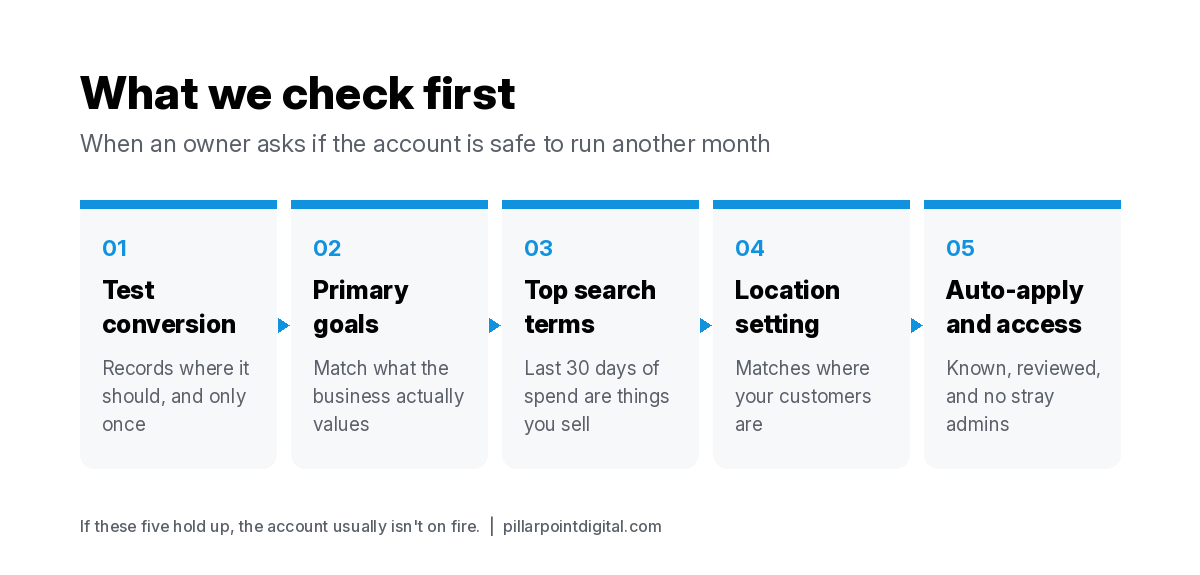
Sometimes an owner just wants to know whether the account is safe to keep running for another month while they decide what to do. When that’s the question, we narrow it down to five checks, in this order:
- A test conversion records where it should, once.
- The primary conversion actions match what the business values.
- The top-spending search terms from the last 30 days are things the business sells.
- The location setting matches where customers are, and the location reports agree.
- Auto-applied recommendations and admin access are both accounted for.
If those five hold up, the account usually isn’t on fire, even if there’s plenty left to improve.
What happens after the audit?
We write the findings in the same order as the checklist, with the fix for each one and a note on whether it needs a developer, a decision from the owner, or a few minutes in the account. Measurement fixes go first, even when they’re less exciting than new campaigns, because every later decision depends on them.
If you’d rather we run this on your account, our free Google Ads audit uses this same list, and you can see how we handle ongoing PPC management once the fixes are in. Have a question before that? Get in touch and one of us will answer it.
FAQ
How often should a Google Ads account be audited?
We run the full checklist when we take on an account, and again any time something big changes, like a new website, a new conversion setup or a switch in bid strategy. The shorter five-check version is worth doing every month, since that’s often enough to catch tracking that broke quietly after a site update.
Can I run this Google Ads audit checklist myself?
Yes, most of it. Everything here is visible inside Google Ads with read-only access or higher. The steps that trip people up are the test conversion and reading the search terms report with a clear sense of what the business actually sells, so those are the two to give the most time.
What access does an agency need to audit a Google Ads account?
Read-only access is enough to view campaigns and run reports, based on Google’s access level table, and it can’t edit campaigns. That’s why we ask for read-only at the audit stage. You can remove it afterward from the access settings in your account.
Is a high optimization score a sign the account is healthy?
Not by itself. Google describes the score as an estimate, and dismissing recommendations changes it the same way applying them does. We’d rather see a modest score on an account with sound tracking than a perfect score on one counting the wrong conversions.
Should I turn off auto-applied recommendations?
Not necessarily all of them. We’d review each type that’s switched on and keep the ones you’d approve anyway. The ones that add keywords or change bidding are the ones we’d want a person at the business to sign off on first.