
A SaaS SEO strategy should start with the pages you already have. For the first 90 days, we audit which feature pages and blog posts compete with your core product page, consolidate the ones that overlap with 301 redirects, and re-point internal links to the page you want found. New blog posts come after that.
We’re a two-founder agency in Fort Wayne, and this is the plan we run when a software company asks us for SEO help. It’s slower than publishing on day one, and some teams push back on that, which is fair. Our reasoning is simple. If five pages on your site are already trying to answer the same search, a sixth one won’t fix anything.
Why wait 90 days before writing new blog posts?
Software sites tend to grow sideways. A feature ships and gets its own page, then a launch post, then a webinar recap, then a “what to look for” guide written by whoever had time that quarter. After a few years, a dozen URLs say roughly what the core product page says, and nobody planned it that way.
Google has to sort that out somehow. Its documentation on canonicalization explains that when Google finds duplicate pages, it picks the one it considers most representative and shows only that version in search results. The page Google picks might not be the one you’d pick. It could be a 2022 announcement post instead of the page with your demo form on it.
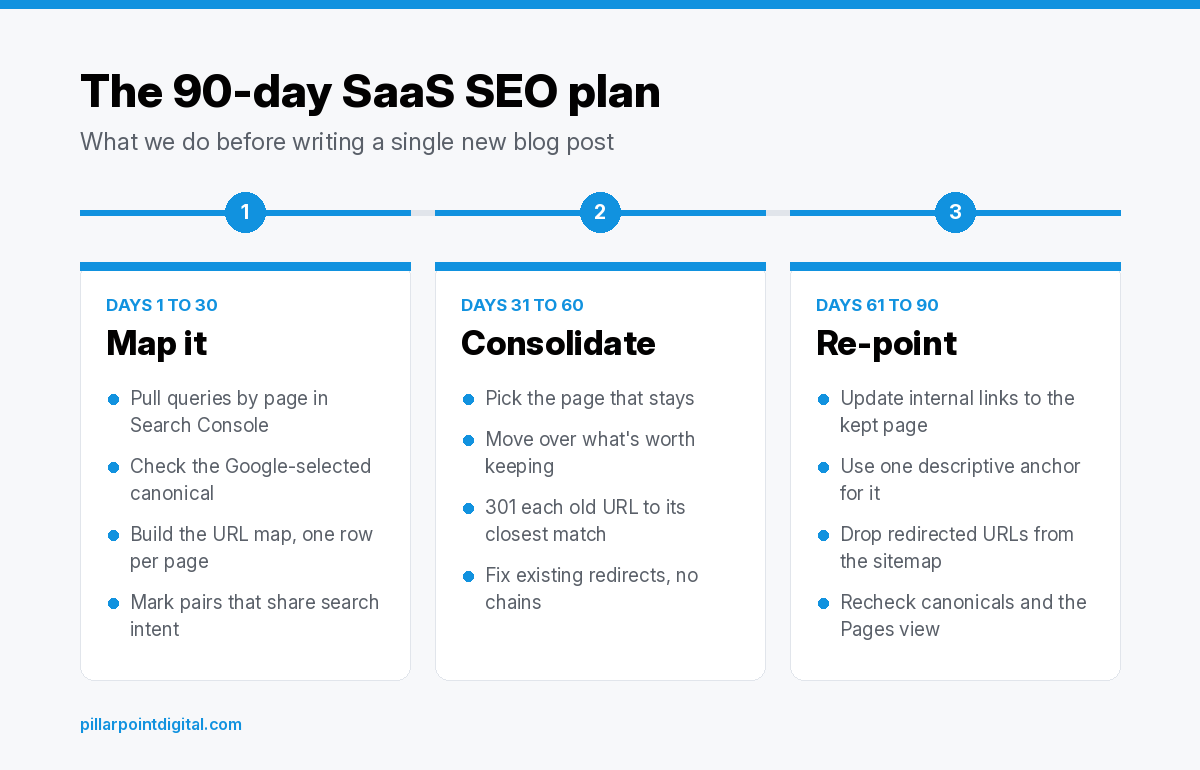
Google’s guidance on helpful, people-first content also lists producing lots of content on many different topics, in hopes that some of it performs well, as a warning sign. Adding more posts before cleaning up the overlap only makes the pile bigger. So we split the first 90 days into three blocks of about 30 days each, shown below.
What happens in days 1 to 30?
The first month is reading, not editing. We don’t change a single URL until we can see the whole picture.
Which queries is each page already showing up for?
We start in the Google Search Console Performance report. Google’s help page explains that it shows clicks and impressions for your site in Google Search, with the past three months as the default view, and that the table can be grouped by dimensions such as Queries and Pages. We filter to one important query at a time, usually the “[category] software” term your core page is built for, and then switch to the Pages tab. If six URLs show up for that one query, that’s our first finding.
We repeat that for the 20 or 30 queries that matter most to the business. Pricing terms, comparison terms, “alternative to” terms and the main category terms all go on the list.
Which page does Google already treat as the canonical?
Next we check what Google decided on its own. The URL Inspection tool shows a Google-selected canonical for any indexed URL, and Google notes that you can only see this in the indexed data, since the live test can’t predict it. We run it on the core page and every page that overlaps with it.
The Page indexing report helps here too. Google describes pages listed as “Duplicate without user-selected canonical” as duplicates where it has chosen another page as the canonical and won’t serve the duplicate in Search. That list often reads like a map of the overlap problem.
What goes in the URL map?
Everything goes into one spreadsheet with a row per URL. Our columns are the URL, the page type (feature, blog, comparison, docs or landing page), the main query it shows for, which page it overlaps with, how many internal links point to it, and how many demo requests or trial signups it drove in analytics. The last column is our call, which stays blank until month two.
How do you tell if two pages compete or just cover related topics?
Shared words aren’t enough. Shared intent is the test.
Say you sell scheduling software for dental offices. Your core page targets “dental scheduling software.” An older blog post titled “Dental Scheduling Software: What to Look For” is aimed at the same person, someone comparing tools, so those two pages compete. A help article on setting up appointment reminders uses a lot of the same words, but the person reading it already bought the product. That one is related, not competing.
We ask three questions for every pair in the map:
- Would someone searching the main query be satisfied landing on either page?
- Do both pages show up for that query in Search Console?
- Could one page become a section of the other without losing anything a reader needs?
Two or three yeses make the pair a candidate to consolidate. One yes usually means the pages can stay separate with clearer titles and better links between them.
What happens in days 31 to 60?
This is the month things change on the site. For each pair we’ve marked to consolidate, we work through the same steps.
- Pick the page that stays. It’s usually the core product page, since that’s the one built to turn a visit into a demo. If a blog post has far more links and the core page is thin, we may keep the post’s URL and rebuild it as the main page instead.
- Move over anything worth keeping. A screenshot that explains a feature well, a good FAQ answer or a comparison table can go into the page that stays. We don’t paste whole posts in, because that just recreates the overlap on one URL.
- Set a permanent server-side redirect. Google’s page on redirects and Google Search recommends a permanent server-side redirect whenever possible when a page’s URL changes, and says 301 and 308 status codes mean a page has permanently moved. It also says Google treats permanent redirects as a signal that the target should be canonical and shows the new target in search results.
- Send each old URL to its closest match. Google’s site move guidance warns against redirecting many old URLs to one irrelevant page, like the home page, which might be treated as a soft 404. It also says that when content from several pages has been consolidated into one, redirecting the old URLs to that page is fine.
- Skip the chains. The same guide says Googlebot can follow up to 10 hops in a redirect chain but advises redirecting straight to the final destination. When an old URL already redirects somewhere, we update that first redirect instead of stacking a new one on top.
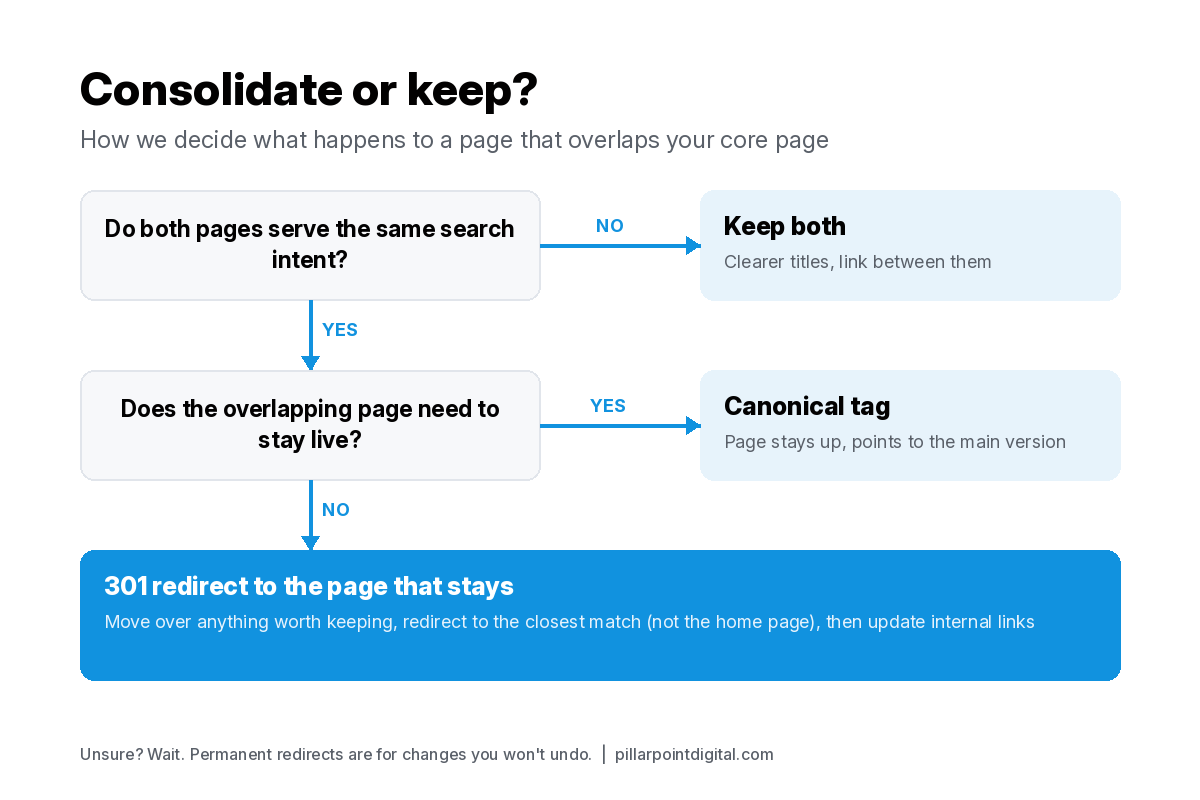
Not every overlap gets a redirect, though. The chart below is how we decide.
When should a page stay live instead of getting a 301?
Plenty of pages look like overlap on the spreadsheet and still deserve to exist. These are the ones we usually leave alone:
- Pages with a different job. Help docs, integration pages for a specific tool, and the pricing page each serve a different moment in the buying process, even if they repeat a few of the core page’s phrases.
- Pages that need to stay reachable. Sometimes a duplicate has to stay live, like a version built for a partner campaign. Google’s page on consolidating duplicate URLs lists redirects and rel=”canonical” annotations as strong signals and sitemap inclusion as a weak one, and says the methods stack when combined. A canonical tag lets the page stay up while pointing Google at the main version.
- Pages where nobody is sure yet. Google says to use permanent redirects when you’re sure the redirect won’t be reverted. If the product team is still deciding whether a feature gets its own landing page next quarter, we wait.
What happens in days 61 to 90?
Redirects catch old links, but they shouldn’t be doing that job forever. Google’s site move guidance tells you to update internal links from the old URLs to the new ones, and it points out that redirects are slow for users. So month three is mostly link work.
We crawl the whole site, pull every internal link that points at a redirected URL, and change the link to point straight at the page that stayed. Navigation menus, footers, old blog posts and docs templates are where most of these hide.
While we’re in there, we check how the links are written. Google’s documentation on crawlable links says it can generally only crawl a link if it’s an <a> element with an href attribute, that anchor text on internal links helps people and Google make sense of your site, and that every page you care about should have a link from at least one other page. We give the core page a consistent, descriptive anchor across the site, the name of the thing you sell, not “click here.”
The rest of the checklist for this month:
- Sitemap. Google describes a sitemap as telling search engines which pages you think are important. Redirected URLs come out of it.
- Title tags. Google’s title link guidance asks for distinct, descriptive text in the title element of each page. Pages that stayed get titles that no longer echo the core page.
- Redirects stay up. Google suggests keeping redirects for as long as possible, generally at least one year. We leave them in place.
- The check-in. Once the kept pages have been recrawled, we look at the Google-selected canonical in URL Inspection again and compare the Pages view in the Performance report with what we saw in month one.
We don’t put a date on when anything moves in search after this. Recrawling happens on Google’s schedule, not ours.
What do we write once the 90 days are up?
By now the URL map is clean enough to show real gaps. Some queries have no page at all. Others have a core page that shows up but doesn’t answer a narrower question people keep asking. Those gaps become the first blog posts.
Every new post gets a row in the map before it gets a draft. It targets a query no other page owns, and it links up to the core page with the same anchor the rest of the site uses. That rule is what keeps the overlap from coming back, since the next launch post or webinar recap has to earn its own row first.
What does this plan look like if we run it for you?
It’s the same 90 days. As a SaaS SEO agency, we do the mapping and the consolidation calls ourselves, and our technical SEO services cover the redirect setup, crawl and sitemap work if your team doesn’t have developer time to spare. If you want a starting point before deciding anything, our free SEO audit looks at many of the same things covered here. More of how we approach search in general is on our SEO page, and if you have a question first, get in touch and one of us will answer it.
FAQ
Is a 301 redirect better than a canonical tag for merging two pages?
It depends on whether the old page needs to stay live. If it doesn’t, we use a 301, since Google lists redirects as a strong canonical signal and recommends permanent server-side redirects when a URL changes for good. If the page has to stay reachable for some other reason, a canonical tag pointing at the main page is the better fit.
Will we lose traffic from the pages we redirect?
We can’t promise either way, and we’d be wary of anyone who does. What we can do is send each old URL to the closest matching page, keep the redirects up for at least a year as Google suggests, and watch the Performance report for both the old and new URLs so any drop shows up early.
Can we keep publishing blog posts during the 90 days?
Yes, as long as each one targets a query nothing else on the site covers. Product announcements and customer stories can keep going too. What we pause is anything aimed at the same terms as the core product page until the map is finished.
What if a feature page brings in demo requests on its own?
Then it probably has a job of its own, and we lean toward keeping it. We check which query it shows for in Search Console. If that query is different from the core page’s main term, the page stays and gets clearer links in both directions.
How many pages usually get consolidated?
There’s no typical number, because it depends on how long the site has been publishing and how many people have written for it. A young product might have two or three overlaps. A site with years of launch posts might have dozens. The URL map from month one tells you, and that’s the reason we build it before touching anything.